
LYRICSNOW HELP CENTER
The answers, in one place.
From your first sign-in to every line of lyrics. Find the guide you need.
Apple TV Four Music Modes Guide
Choose a playback mode, set up Apple Music, Shazam, or Sonos, and find the separate Spotify sign-in guide.
Spotify Sign-in & Client ID Setup
Choose your sign-in method and set up Spotify App or Client ID authorization.
Apple TV Spotify Sign-in Guide
Generate dedicated tvOS credentials on iPhone / iPad, then sign in to Spotify on Apple TV with iCloud or manual entry.
Getting started
What is LyricsNow?
LyricsNow is a third-party lyrics and music companion. It matches lyrics to the song being played or recognized, with features such as translations, word-by-word highlighting, playback controls, and lyrics across devices. Available features depend on your device, music source, and authorization method.
Is LyricsNow free? Do I need a separate subscription?
LyricsNow itself is free, and supporting the developer through a tip is optional. Spotify Premium and Apple Music subscriptions are provided by those services. LyricsNow does not activate or replace a music subscription.
Do I need a LyricsNow account?
No. LyricsNow does not have its own user-account system. Authorize the music service you want to use, such as Spotify or Apple Music. Cross-device sync uses your own iCloud account.
Which devices and music sources are supported?
LyricsNow has iPhone / iPad, Mac, and Apple TV versions. iPhone / iPad offer Spotify, Apple Music, and Shazam recognition. Mac also offers sources such as system audio and Audirvana. Apple TV 1.3 offers four modes: Apple Music playback on this Apple TV, Spotify remote control, Shazam recognition shared from a mobile device, and Sonos speaker integration. Features differ by platform and version; check the options available in your app.
Where should I start?
Choose a music provider in Settings, complete authorization, and start a song before opening the lyrics view. On iPhone / iPad, Spotify users can connect through Spotify App authorization or configure a Client ID. For music playing around you, open Shazam mode.
Why does LyricsNow show no playback or no song information?
Check that music is playing, the selected source is correct, and you are using the same music account. Spotify App mode also needs a connection to Spotify on this device. Start playback in the original music app, return to LyricsNow, and follow any authorization or reconnection prompt.
Spotify sign-in and limits
What is the difference between Spotify App and Client ID authorization?
Spotify App connects through Spotify installed on your device, without entering your own Client ID. It supports lyrics sync and permitted playback controls, with more limited search, library, and queue features. Client ID uses Spotify's Web API and requires your own setup. Its browsing and control features still depend on account access, developer mode, and available endpoints.
How do I authorize through the Spotify app?
Install Spotify on your iPhone / iPad and sign in. In LyricsNow Settings, choose Spotify, select Spotify App as the authorization method, and use the authorization button. Finish in Spotify, return to LyricsNow, and wait for the connection.
Can I use a Spotify Free account?
On supported iPhone / iPad versions, Spotify App authorization can connect a Free account. Playback, choosing tracks, and skipping remain subject to Spotify's account restrictions. This does not give Free accounts all Premium features. Spotify distinguishes shuffle playback for Free users from on-demand playback for Premium users. Spotify's explanation
Does Spotify App mode require Spotify on this device?
Yes. This method connects to the local Spotify app. Signing in on the website or playing on another device does not replace installation and sign-in on this device. Install and sign in to Spotify first, then authorize again in LyricsNow.
Where do I get a Client ID, and what redirect URI should I use?
Create or configure an app in Spotify Developer Dashboard, then enter its Client ID in LyricsNow. The required redirect URI is lyricsnow://spotify-callback. Client ID and Client Secret are different fields; do not paste the secret into the Client ID field. Follow the sign-in guide from Spotify Sign-in & Client ID Setup. Screenshots show an earlier interface; follow the linked illustrated guide for the full steps.
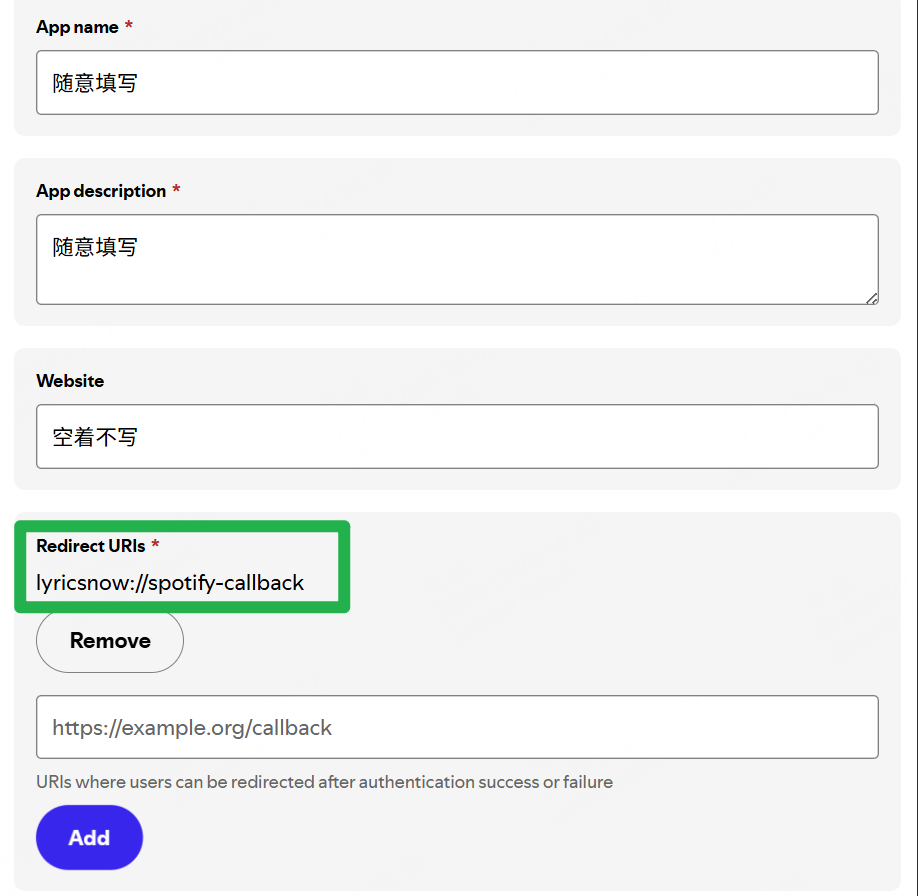
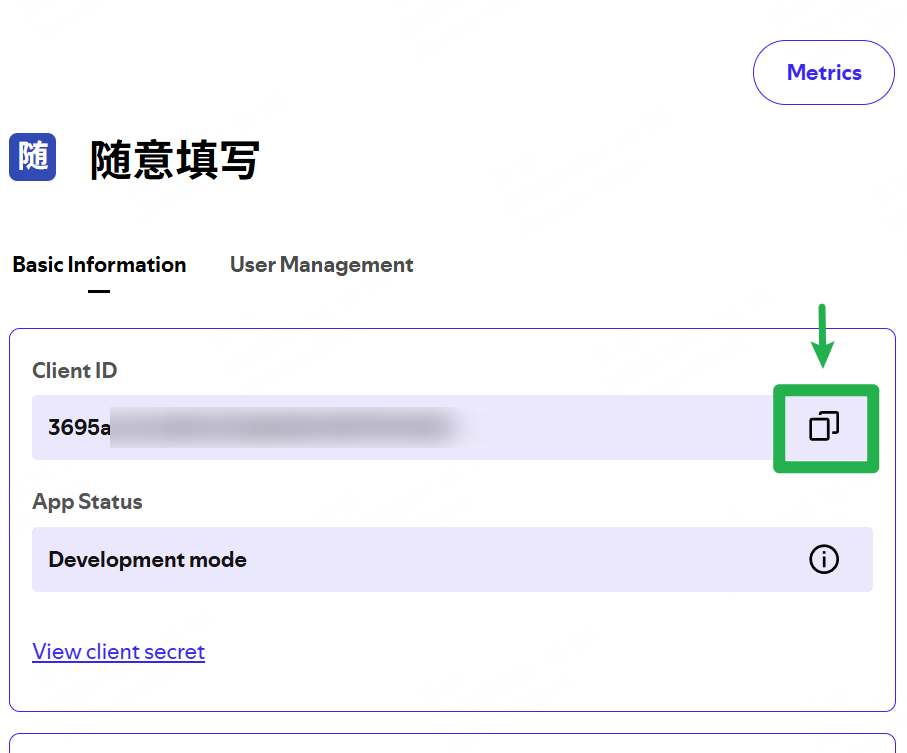
Can I reuse a Client ID I already have?
Yes, if that developer app is still eligible and available. Check that it includes the redirect URI required by LyricsNow. You can also add the LyricsNow callback to an existing developer app used for another purpose, rather than creating another app just for LyricsNow.
What if I cannot see Create App in a mobile browser?
Try landscape orientation or open the dashboard in a desktop browser. If Spotify reports an account-eligibility issue, an app-count limit, or another restriction, follow that message. Rotating the screen can help with display issues but cannot remove account restrictions.
Why does the Client ID method require Spotify Premium?
Spotify currently requires the owner of a Web API development-mode app to have Premium. Some remote playback operations also require Premium. A subscription does not remove API or developer-mode restrictions. Check Spotify's development-mode rules and the actual error message.
Why is content empty, or why do I get 403 after successful sign-in?
Successful authorization does not grant access to every endpoint. Check the Client ID, developer app, account eligibility, and development-mode requirements. If another Spotify account is authorizing, check the app's user allowlist. Spotify notes that a user may sign in successfully yet receive 403 on API requests without the required access. User-access guidance
Why do I need to open Spotify again to reconnect?
Spotify App mode depends on a connection to Spotify on this device. App restarts, time in the background, or an expired connection may require opening Spotify to authorize or reconnect. Use the prompt in Settings or the player. A single authorization cannot guarantee a permanent connection.
Why does music sometimes start when I authorize?
Spotify's authorization or wake-up flow may resume previous playback or start a track. After the connection is established, pause if needed. Spotify's authorization and wake-up flow
Why are full search, playlist editing, or the full queue missing in Spotify App mode?
This mode currently does not provide full-catalog search, playlist editing, or reading the actual playback queue. Library views only show the content Spotify returns through this mode, so some controls are hidden or show a limitation message. Use the Spotify app for those tasks, or the Client ID method when eligible.
Why does a playlist or library show only about 20 items?
Spotify App mode may return only part of a playlist or library. LyricsNow shows the items actually received, which is not necessarily your full collection. The authorization-mode limit message does not mean every account always has a fixed 20-item limit. View the full list in Spotify.
Why are artist albums, track durations, or release details missing?
Spotify App mode provides a limited set of metadata, and its current artist page does not show the album section. Missing artist links, release dates, or track durations may remain blank or unavailable. This does not mean the original song or album does not exist.
Apple Music
How do I start using Apple Music?
Select Apple Music in LyricsNow Settings and complete system authorization. On iPhone / iPad / Mac, the system Music app can help check the account and playback. On Apple TV, follow tvOS Apple Music setup and use LyricsNow’s Apple Music Account page to check access. Subscription-catalog playback requires eligible Apple Music access. See Apple’s access guidance.
Why is my Apple Music library empty after authorization?
Check the current media account, LyricsNow’s media and Apple Music permissions, and the network. On iPhone / iPad / Mac, the system Music app can help check the library. On Apple TV, check cloud-library status on LyricsNow’s Apple Music Account page and follow tvOS library troubleshooting. Return to the foreground or reopen the app and try again. If it still fails, report the OS version, app version, and affected library category.
Why do official Apple Music lyrics need separate setup?
System authorization for your music library and playback is separate from the Apple Music official-lyrics source in Settings. To use that source, follow its instructions to enter and validate the required credential. Granting system music access alone does not configure this lyrics source.
Is the Apple Music metadata option the same as switching playback providers?
No. The metadata option supplements album descriptions, genres, and related music information. The selected music provider determines the playback and browsing source. Enabling metadata does not itself switch the service currently playing.
Why do the same song's title, artwork, or lyrics differ between services?
There may be studio, live, rerecorded, regional, or other versions, with different title languages. Compare the artist, album, duration, and recording you hear when choosing lyrics. Apple Music's Chinese-title display and lyrics-search option can also change the names used for display or searching.
Lyrics, translations, and timing
Why are no lyrics available?
First check that the song information is correct, then check the network and available lyrics sources. Not every recording has lyrics. Open manual lyrics matching, search by title and artist, and try another source. If no suitable result is available, import a lyrics file on a supported platform.
What should I do if LyricsNow matches the wrong song or version?
Open manual lyrics matching and search with a more precise title and artist. Choose the correct recording, distinguishing live, instrumental, remix, and studio versions. If the words are correct but the entire timeline is early or late, adjust the timing offset.
Are manual lyrics selections remembered? How do I return to automatic matching?
A manual choice is saved for that song. Enable manual-selection sync to share it across supported devices. Reset on the candidate page clears the manual choice and lets automatic selection run again. Resetting the choice does not delete imported lyrics files.
How do I change which lyrics source is tried first?
Open Lyrics Source Settings and reorder the sources. Disabled, unvalidated, or unavailable sources are skipped. An existing manual selection takes priority; imported local lyrics also follow their own priority rules.
Why are translations or romanized lyrics missing even with the option on?
These switches show text already included in the selected lyrics version; they do not generate missing translations or romanization. Try another candidate or enable translated-lyrics priority. That option continues looking for a translated candidate if a higher-priority source has none.
Why do I only get line-by-line lyrics instead of word highlighting?
Word highlighting requires word-level timing in the lyrics and the relevant karaoke / word-by-word option. A switch cannot turn line-timed lyrics into accurately word-timed lyrics. Try another candidate or a local file with word timing.
How do I show duet or background-vocal lyrics?
The lyrics source must provide that structure, and your app version must support it. You can configure the Apple Music lyrics source and try the duet / background-vocal priority option. Not every song has this data.
How do I fix lyrics that are early or late?
Open the lyrics quick settings and adjust the offset in small 0.5-second steps while listening. A positive general offset advances the lyrics; a negative offset delays them. Tap the displayed offset to reset it to zero. If only one song is affected, first check that the lyrics match the recording.
Why do lyrics run too fast after the next song starts?
Try pausing and resuming. In Spotify or Apple Music modes that support seeking, tapping the relevant lyric line can realign playback. With Spotify Client ID authorization, also check automatic playback-progress calibration. If it happens repeatedly, report your Spotify version and authorization method.
Why can crossfade or DJ transitions affect lyric timing?
During a transition, the position reported by the music service may temporarily differ from what you hear. Spotify's Client ID method offers normal, DJ, and crossfade calibration options that can be adjusted by listening; calibration may change playback position. Spotify App mode mainly follows Spotify's reported state, so the same troubleshooting does not apply to both methods.
Do I need to sign out of my music account when an official-lyrics credential expires?
First update and validate the affected credential in the Spotify or Apple Music official-lyrics settings. Lyrics-source credentials and playback sign-in are separate. If playback still works, you usually do not need to sign out of the whole account. You can also try other enabled lyrics sources.
Importing local lyrics on iPhone / iPad / Mac
How do I import my own lyrics?
Play the target song, open its lyrics candidates, select Upload, and choose the file. The import is bound to the song and playback source active when you select Upload. If you change songs during the import, the file still belongs to the original song. Manage imported files under Local Lyrics in Settings.
Which file formats are supported?
Supported formats include standard timed LRC, NetEase YRC, plain-text QRC / XML, TTML compatible with Apple's lyrics structure, and supported Spotify / NetEase lyrics JSON structures. Plain TXT, Enhanced LRC, binary KRC, encrypted QRC, and subtitle formats are outside the current support. Renaming a file extension does not convert its format.
What if importing fails, the file is too large, or the text is garbled?
Each file must be no larger than 5 MB and contain valid, parseable lyrics. Supported encodings include UTF-8, UTF-16 / UTF-32 with a BOM, and GB18030. Try saving as UTF-8 if needed. Check the error message, file contents, encryption, and timestamps if the import still fails.
Can one song have several local versions? Which version takes priority?
Yes. Local candidates appear at the top of the list, and several versions can be kept. Importing identical content reuses an existing record. An explicit manual selection takes priority. Without one, available local lyrics are preferred before the normal online automatic-selection process.
What is the difference between Reset, Delete, and clearing all imported lyrics and history?
Reset clears a song's manual selection without deleting the file. Delete removes the selected local lyrics. Clearing all imported lyrics and history removes imported lyrics and their related local selection history. If lyrics-folder iCloud sync is enabled, deletion or clearing also affects other devices using that synced library.
Can imported lyrics sync between iPhone, iPad, and Mac?
Enable iCloud lyrics-folder sync under Local Lyrics. It is off by default and requires the same iCloud account with iCloud Drive enabled. Turning it on or off migrates files. If downloads are incomplete or a file is invalid, wait or resolve the reported issue before trying again.
Why does editing an original file in the lyrics folder not update the app?
The app's parsed lyrics record is separate from the original-file copy kept for reference. Editing that copy does not automatically update an existing record. Import the modified file again and select it in the candidate list.
Floating lyrics, appearance, and sharing
How do I enable floating lyrics on iPhone / iPad?
Enable the main Floating Lyrics switch in Settings, then use the floating-lyrics control on the lyrics page. This uses system Picture in Picture and is tied to the lyrics view. Starting it also depends on device support and system state.
Why do floating lyrics close when I return to the app or leave the lyrics page?
Floating lyrics are designed to accompany the lyrics page. Check the option to keep floating lyrics when returning to the app. Leaving the lyrics page for other pages within LyricsNow may close them according to the app's behavior.
Why are translations or word highlighting missing from floating lyrics?
The small floating-window size does not show translations; try medium or large. Word highlighting also requires the floating-lyrics karaoke option and lyrics that contain word-level timing.
Will lyrics always stay accurate in the background or on the lock screen?
That cannot be guaranteed, especially in Spotify App mode. The system may interrupt the connection to Spotify. A visible floating window can continue from the last reported position without knowing about actual track changes or seeking. Return to the foreground and reconnect to restore the real playback state.
Why is animated artwork missing? How can I reduce stuttering, heat, or battery use?
Animated artwork requires both an enabled option and available artwork for that content; not every album or playlist has it. Try disabling animated covers, animated artwork for pinned home content, or the ambient immersive effect, then compare with a normal background. Pinned home content in Spotify App mode does not use animated artwork through that feature.
How do I share lyrics or save a lyrics image?
Open Share Lyrics in a supported lyrics view, select lines, then share or save the image. If saving fails, check Photos permission and available storage. Saving a lyrics image does not download the song audio.
Shazam recognition
What does Shazam mode do, and how do I open it?
On supported iPhone / iPad versions, select the Shazam / LyricsNow symbol at the top left of Home and start recognizing music around you. Recognition supplies the song information used to load lyrics. Mac also has a separate Shazam recognition window.
Why is microphone permission needed? Are recordings saved?
Recognition needs an audio signal it can identify. Under the current privacy policy, LyricsNow does not save microphone recordings. Apple / Shazam processes recognition data under its own policies. If permission was denied, allow it in system privacy settings. See the privacy policy, currently in Chinese: Privacy Policy.
What if recognition fails or identifies the wrong song?
Reduce background noise, let the device hear the music clearly, and try a passage with a recognizable melody or vocals. Recognition is not always correct. If the song was identified correctly but the lyrics version is wrong, use manual lyrics matching.
Why can't tapping a lyric seek the music in Shazam mode?
Shazam mode follows a recognition result and does not directly control the external player you are listening to. Tapping lyrics cannot seek that original playback. Use the original player to change the position.
Can it recognize automatically, or open Shazam on launch?
The recognition page offers manual recognition and available automatic intervals. In Shazam Settings, you can also enable opening Shazam mode at launch. Enabling that disables the separate option to open the lyrics page at launch, so the two launch actions do not conflict.
Apple TV modes and playback
How do the four Apple TV modes differ, and where does the sound play?
Apple Music uses LyricsNow itself as a player on this Apple TV. Spotify remotely controls a Spotify playback device, which produces the sound. Shazam receives song information recognized by an iPhone / iPad; music stays on its original source. Sonos reads the selected speaker’s playback information, while audio stays on Sonos. All four can match lyrics, but they do not use the same audio path. For setup, see the Apple TV Four Music Modes Guide.
Where do I change the Apple TV playback source? Can several sources run together?
Open Settings → Playback & Accounts → Playback Source and choose Spotify, Apple Music, Shazam, or Sonos. The selection applies to this Apple TV, independently of the provider selected on your phone. Only one source is active. Leaving Apple Music mode pauses LyricsNow’s own playback. Switching sources does not transfer Spotify or Sonos audio; check the connection or selected device when returning to those modes.
Apple TV · Apple Music
How do I start Apple Music on Apple TV? Are mainland China accounts supported?
Yes. Mainland China Apple Music accounts are supported without switching to another storefront for LyricsNow. Sign in to the intended media account on Apple TV, select Apple Music as the LyricsNow playback source, and allow system access. Settings → Playback & Accounts → Apple Music Account shows authorization, subscription, cloud-library status, and storefront. This uses system MusicKit, not a Spotify Client ID, Spotify tvOS credentials, or playback relayed from a phone. Catalog playback still requires an eligible subscription.
What if Apple TV asks me to confirm a privacy statement but shows no place to do it?
Cause: The official Music app (Apple Music) has never been opened on this Apple TV, so first-time setup and initialization have not been completed.
Solution 1:
1. Uninstall LyricsNow, then switch to an account for another region.
2. Disconnect Apple TV from the network.
3. Switch back to the mainland China account, then reconnect to the network.
4. Open the official Apple Music app again.
5. Switch to the other-region account again, then reinstall LyricsNow.
Solution 2: Temporarily switch to an account for a region that supports the official Music app, such as the US. Open that app, personally read and confirm the privacy statement, service terms, and any other required prompts, then complete initialization and reach its main screen.
Switch back and refresh: Switch back to the mainland China account. Open LyricsNow Settings → Playback & Accounts → Apple Music Account, refresh, and check Account Region.
How can I recover from playback error 06 after switching back to a mainland China account?
Cause: A caching bug in Apple TV’s user switching prevents the switch between accounts from different regions from taking full effect.
Sign in to the Store again: Open Apple TV Settings → Users & Accounts / Profiles & Accounts → the mainland China user → Store. Sign out of the Store, then sign back in to the same mainland China account. Keep the user profile and iCloud signed in.
Refresh and check: Restart LyricsNow, open Settings → Playback & Accounts → Apple Music Account, and refresh. Check Apple Music Access, Subscription Playback, and Account Region.
Why does Apple Music still ask for a subscription after I allowed access?
System authorization lets LyricsNow access Apple Music; it does not provide a subscription. Catalog playback also requires eligible Apple Music access for the current Apple TV media account. Refresh the status on the Apple Music Account page and check the system media account and subscription. LyricsNow being free does not make Apple Music’s subscription catalog free or bypass regional availability.
What if Apple Music plays, but my library is empty or asks for Sync Library?
Playback eligibility and cloud-library access are checked separately. Enable Sync Library for the same media account in Apple Music and confirm that the account contains saved music, then refresh access on LyricsNow’s Apple Music Account page. The library has Songs, Albums, Playlists, and Artists categories and loads more as you approach the end. Retry a failed request using its error prompt. Without cloud-library access, personal-library browsing and writes are unavailable; that does not mean catalog search is unavailable.
What appears on the Apple Music Home tab, and why are some sections missing?
Home provides Recently Played, your playlists, Recently Added, recommended playlists, and recommended stations when the account returns usable content. Recently Added combines library albums and playlists. Personal content depends on the account, subscription, and cloud library. Empty or unavailable recent-history and recommendation sections are hidden; generic charts are not substituted for personal recommendations. Your playlist shelf loads further items as you approach its end.
What is available in Apple Music Discover and genre pages?
Discover offers top playlists, songs, and albums, together with additional charts, city playlists, and personal recommendation groups returned by the service. Genre pages show songs and albums before related playlists. Content depends on the current storefront and service availability; personal recommendations are not guaranteed for every account. Artist detail pages show and play up to ten top songs, while their album lists can continue loading.
Can I search Apple Music directly on Apple TV?
Yes. Open Search in Apple Music mode, enter a song, album, playlist, or artist name, and select the Songs, Albums, Playlists, or Artists category. This searches the current Apple Music catalog, not Spotify or only your saved library. Open a result for details or playback. Actual playback remains subject to subscription, region, and content availability.
Which Apple Music playback and queue controls are available?
LyricsNow can play or shuffle songs, albums, and playlists, with pause, previous/next, seeking, shuffle, and repeat controls. The queue shows the current and upcoming entries and lets you select an entry to play. Supported context menus can add music to Play Next or the queue’s end. For stations, Apple Music determines programming and available controls; a complete editable list like a fixed album is not guaranteed.
Can I add music to my Apple Music library or a playlist from Apple TV?
Where the actions are available, you can add songs, albums, or playlists to your library and add songs to editable playlists in your account. Apple Music authorization and cloud-library access are required. Read-only playlists are not offered as writable targets. If you have no editable playlist, create one in Apple Music and try again. Successful actions show a brief confirmation; check the error message if a write fails.
What do the Lossless and Dolby badges mean? Can I choose audio quality?
The badges follow the current playback audio variant reported by MusicKit, rather than just the formats a song advertises. LyricsNow does not currently provide its own audio-quality selector. The actual format depends on the track, system music settings, and audio-output capabilities. Not every track or setup shows a Lossless or Dolby badge, and a badge is not a guarantee of lossless, Atmos, or high-resolution delivery across the entire output chain.
How do I enable Apple Music Lossless or Dolby Atmos on Apple TV if Music settings are missing for a mainland China account?
Quality and badges: LyricsNow has no independent quality setting. MusicKit selects the format using system preferences, network conditions, the track, and audio output. Lossless and Atmos are different audio versions; support for a format does not mean it is active now. Badges follow MusicKit’s actual state and do not guarantee lossless or Atmos across the entire output chain.
Enable Lossless: Choose Lossless under Apple TV Settings → Apps → Music → Audio Quality.
Enable Dolby Atmos: Choose Automatic under Apple TV Settings → Apps → Music → Dolby Atmos, then adjust Settings → Video and Audio → Audio Format → Spatial Audio (if that group appears) → Dolby Atmos.
Missing Music settings with a mainland China account: Temporarily switch the user to an account for another region that displays these settings, such as the US, then enable them.
What should I do if Apple Music permission is denied or restricted?
Check LyricsNow’s media and Apple Music access in Apple TV system settings. If permission was denied, allow it again there. A restricted status can require reviewing device or account content/privacy restrictions; it is not an authorized state. Return to LyricsNow and refresh Apple Music Account afterward. Generating Spotify tokens again will not help, and music authorization is separate from lyrics-source credentials.
What if Apple Music is authorized and subscribed, but playback still fails?
Refresh Apple Music Account and check authorization, playback eligibility, and storefront, then verify the Apple TV media account and network. If the system Music app is available, it can also help check the same content. Some releases may have been removed or may be unavailable for the current region or account. Report the displayed error, song and album, OS version, and app version. Do not send passwords, tokens, or other authorization credentials.
Why can Apple Music play while artwork or lyrics are missing? Does authorization enable official lyrics?
Playback, artwork metadata, and lyrics matching use separate requests. Check the recording version and network, then try manual lyrics matching. Some releases or regions may lack usable artwork or lyrics. System MusicKit authorization does not configure the separate Apple Music official-lyrics source; follow that source’s settings instructions. Missing artwork or lyrics alone does not require deleting an otherwise working music account.
Apple TV · Spotify
How do I sign in to Spotify on Apple TV?
Select Spotify under Settings → Playback & Accounts → Playback Source on Apple TV, then open Sign In. Spotify uses a dedicated tvOS flow: configure Client ID access in LyricsNow on an iPhone / iPad, generate Apple TV credentials there through tvOS Login, and sync them through the same iCloud account or enter them manually. This flow is only for Spotify. Apple Music uses system authorization on Apple TV and needs neither a Client ID nor these credentials. See the Apple TV Spotify sign-in guide. The images below show the earlier Spotify sign-in interface.
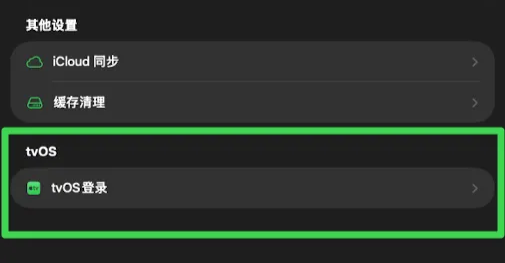
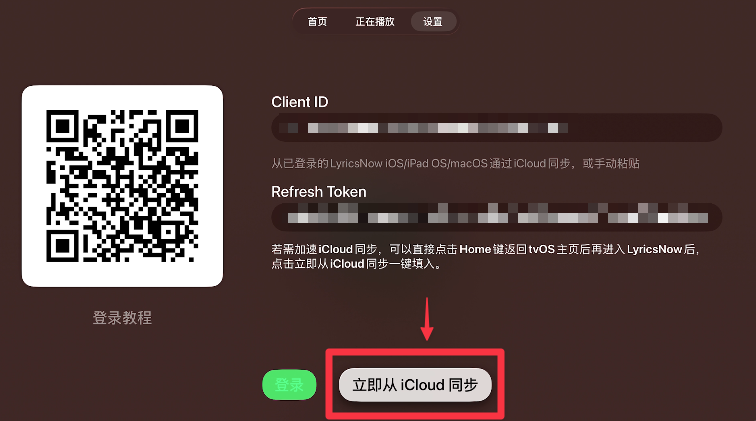
Why doesn't Spotify App authorization on iPhone sign me in on Apple TV or Mac?
That method depends on the local iOS Spotify connection. Its sign-in mode and connection credentials do not sync as a general session for other platforms. Spotify mode on Apple TV still needs its dedicated tvOS flow; Mac uses its own authorization options.
What if iCloud does not fill the Spotify sign-in fields on Apple TV?
Confirm that both devices use the same iCloud account and that the source device generated and synced fresh Spotify credentials through tvOS Login. On the Apple TV Spotify sign-in page, choose Sync from iCloud Now, allow time for sync, and try again. If the fields remain empty, follow the manual-entry instructions. Apple Music does not use this sign-in page or these synced credentials.
Can I keep pasting old Spotify tvOS credentials after they stop working?
Generate fresh dedicated credentials through tvOS Login on the source device, then sync or enter them again. Each generated tvOS token is for one sign-in; generate a new one when signing in again. Do not reuse the source device’s everyday session credentials as tvOS credentials, or include credentials in support reports.
Why is Spotify empty, returning 403, or unable to control playback after sign-in on Apple TV?
Successful web sign-in does not grant every API capability. Check your Client ID, authorized account, and the developer app’s user-access settings. Spotify’s current development-mode eligibility and some playback controls depend on Premium, permissions, and a valid playback device. Start a song on a Spotify device and try again. Follow the actual error and Spotify’s development-mode requirements; syncing the same old credentials repeatedly cannot remove platform restrictions.
Does Spotify mode play Spotify audio directly through LyricsNow on Apple TV?
Current Spotify mode reads playback state and sends controls through Spotify’s APIs; it does not turn LyricsNow into a local Spotify audio player on Apple TV. Start playback on a phone, computer, or another Spotify device and check the active device. Sound comes from the device Spotify is using. For LyricsNow itself to play music on Apple TV, choose Apple Music and meet its authorization and subscription requirements.
Apple TV · Shazam companion
How do I show Shazam results on Apple TV?
Connect the iPhone / iPad and Apple TV to the same local network. Select Shazam under Settings → Playback & Accounts → Playback Source on the TV. In LyricsNow on the mobile device, open Shazam, recognize the music, choose Sync tvOS in the playback screen’s additional settings, and connect to the Apple TV. Open the TV playback tab for lyrics. Allow microphone and local-network access on the mobile device; keep Shazam mode open on the TV. Recognition information and progress are shared, not audio.
What if Shazam companion cannot find Apple TV, or its lyrics do not update?
Check that Shazam is selected on the TV, LyricsNow’s Shazam screen is open on the mobile device, and the required permissions are allowed. Both devices must be on a local network that permits discovery; guest networks or client isolation can prevent it. Confirm that the mobile device recognized the new song, then search and connect again through Sync tvOS. After a successful connection, you can enable reconnecting to the last device.
Can Shazam companion recognize music on the TV, stream phone audio, or control the original player?
This mode does not provide those functions. Recognition runs in LyricsNow’s Shazam mode on an iPhone / iPad. The TV receives title, artist, artwork, and progress information for lyrics; it does not capture TV microphone audio or forward the phone’s audio. It is neither AirPlay nor a remote for the original player. Pause or change tracks on the device actually playing the music.
Apple TV · Sonos
How do I use Sonos mode on tvOS? Can it run with Shazam?
Select Sonos under Settings → Playback & Accounts → Playback Source, then open Sonos Devices, scan for a speaker on the same local network, and select it. Start playback on Sonos and open the TV playback tab for lyrics. Only one of the four sources is selected at a time; Sonos and Shazam do not supply the current song simultaneously. Audio stays on the Sonos speaker. Changing the LyricsNow source does not transfer that audio to the TV.
Which Sonos speaker should I select, and what if rooms or groups change?
Open Sonos Devices from the Sonos Home screen or the Sonos Devices entry in Settings, scan, and select the speaker whose lyrics you want to display. In a multi-room setup, check its name and selection state. If room/group changes or a new speaker address leave old or missing information, scan again and select the device currently playing. The selection determines whose playback information LyricsNow reads; it does not move audio to the TV.
Which music services can Sonos use, and why are some details or controls missing?
Start music through the Sonos app or another supported Sonos source. LyricsNow follows the selected speaker’s song and playback information; you do not need to replace the speaker’s service account with an Apple Music or Spotify sign-in inside LyricsNow. Services, radio streams, and inputs may expose different metadata and controls. Without usable title, artist, or progress information, lyrics matching and timing can be limited.
What should I check if Sonos speakers cannot be found or playback stops updating?
Confirm that Apple TV and Sonos are on a mutually reachable local network. Check for guest networks, client isolation, or rules that block discovery. Make sure the speaker is playing, then scan again and select the correct device. After network or grouping changes, let the connection settle and retry. Report the selected speaker, playback source, and displayed error if the problem persists.
Mac desktop lyrics and playback sources
Which players can provide lyrics on Mac?
Mac offers sources including Spotify, Apple Music, Shazam, system audio, and Audirvana. System-audio mode depends on the media information the player exposes. Matching cannot be guaranteed without usable title, artist, or progress information. Choose the correct source and start music in that player first.
How do I open desktop lyrics? Why can't I drag or click the window?
Use Open Desktop Lyrics or a configured shortcut. When desktop lyrics are locked, the window ignores mouse events and lets clicks pass through. Unlock it in Settings before moving or resizing it.
Why do desktop lyrics disappear when paused or on another desktop?
Check Hide Desktop Lyrics When Paused and the option to show on all desktops. The first temporarily hides lyrics when paused or nothing is playing; the second controls whether they appear in other Spaces and full-screen windows.
Why can't desktop translations and dual-line lyrics appear together?
Desktop lyrics have a separate translation setting. Dual-line mode uses the lower area for the next lyric line and turns translations off. To show translations, turn dual-line mode off and desktop translations on.
What if Mac shortcuts fail or Audirvana information is unavailable?
For shortcuts, check the main enable switch, the individual shortcut, and conflicts. A recorded combination must include a modifier key. For Audirvana, start playback and allow LyricsNow's automation access. Use the Open Audirvana and Authorize option and follow the system prompt.
iCloud, cache, and recovery
Are settings sync, manual-selection sync, and lyrics-folder sync the same switch?
No. The first two are in iCloud settings and control preferences and manual lyrics choices. Lyrics-folder sync is under Local Lyrics and transfers the imported files themselves. Syncing a selection record alone does not sync its local lyrics file.
Why hasn't another device synced yet?
Check the iCloud account, the relevant sync switches, and the network. Local lyrics files also require iCloud Drive and completed downloads. Each platform only applies the settings and features it supports, so every screen need not look identical.
Will all music accounts sign in automatically when settings sync?
No. Some settings and dedicated Spotify tvOS credentials can sync, but system media permission and connections to the local Spotify app still need to be completed on the relevant device. Apple Music on Apple TV uses that device’s media account and system authorization; having Spotify credentials in iCloud does not authorize it. Synced settings do not mean all music services are authorized.
What is the difference between clearing cache, iCloud data, and imported lyrics?
Clearing cache mainly removes downloadable images and animated artwork. Clearing iCloud data concerns cloud settings and manual lyrics-selection records, not the local lyrics library. Clearing all imported lyrics and history deletes imported lyrics and related local selection history. If lyrics-folder sync is enabled, that last action affects other devices using the synced library.
Can settings and imported lyrics return after reinstalling?
Successfully synced settings, manual choices, and cloud lyrics files can return when the same iCloud account and relevant sync features are available. Content stored only locally cannot be assumed to return. Before reinstalling, confirm the content you need has synced and keep separate copies of original lyrics files if necessary.
Privacy and support
What information does LyricsNow use or send to services?
Authorized features may use playback state, song identifiers, titles, artists, and library information, and make requests to relevant music or lyrics services. Some settings and data can sync through your own iCloud account. For data uses, permissions, and deletion, see the privacy policy: Privacy Policy.
Should I send passwords, cookies, or tokens when reporting a problem?
No. Do not send account passwords, refresh tokens, sp_dc, media-user-token, or other authorization credentials. Redact these from screenshots or logs. The error message, selected mode, and reproduction steps are usually enough to start investigating.
How should I report a problem?
Email gh531198052@gmail.com with the device model, OS version, LyricsNow version and build, music provider, Spotify authorization method if relevant, steps to reproduce, expected and actual behavior, and redacted screenshots. For lyrics problems, include the title, artist, recording version, and selected lyrics source. See Lyrics Now Support & Help.
No matching answers yet
Try a shorter keyword or choose another topic.
Need a little more help?
Your device, app version, and steps to reproduce will help us understand the issue.